Agentic product design harness
Seven design processes built from 17 skills, from object model to developer handoff.
- Client
- Own work
- Role
- Designer and builder
- Year
- 2026
I built my own product design harness: 17 skills combined into seven design processes that write down how I structure, review and document products, so AI tools follow the same standards I do. It covers UX architecture, design-system audits and repairs, design and accessibility review, and handoff. I use it every day, and I check and decide every step.
- 17Skills in the harness
- 7Design processes, from object model to handoff
- 1 runFull design-system audit, repair and re-check
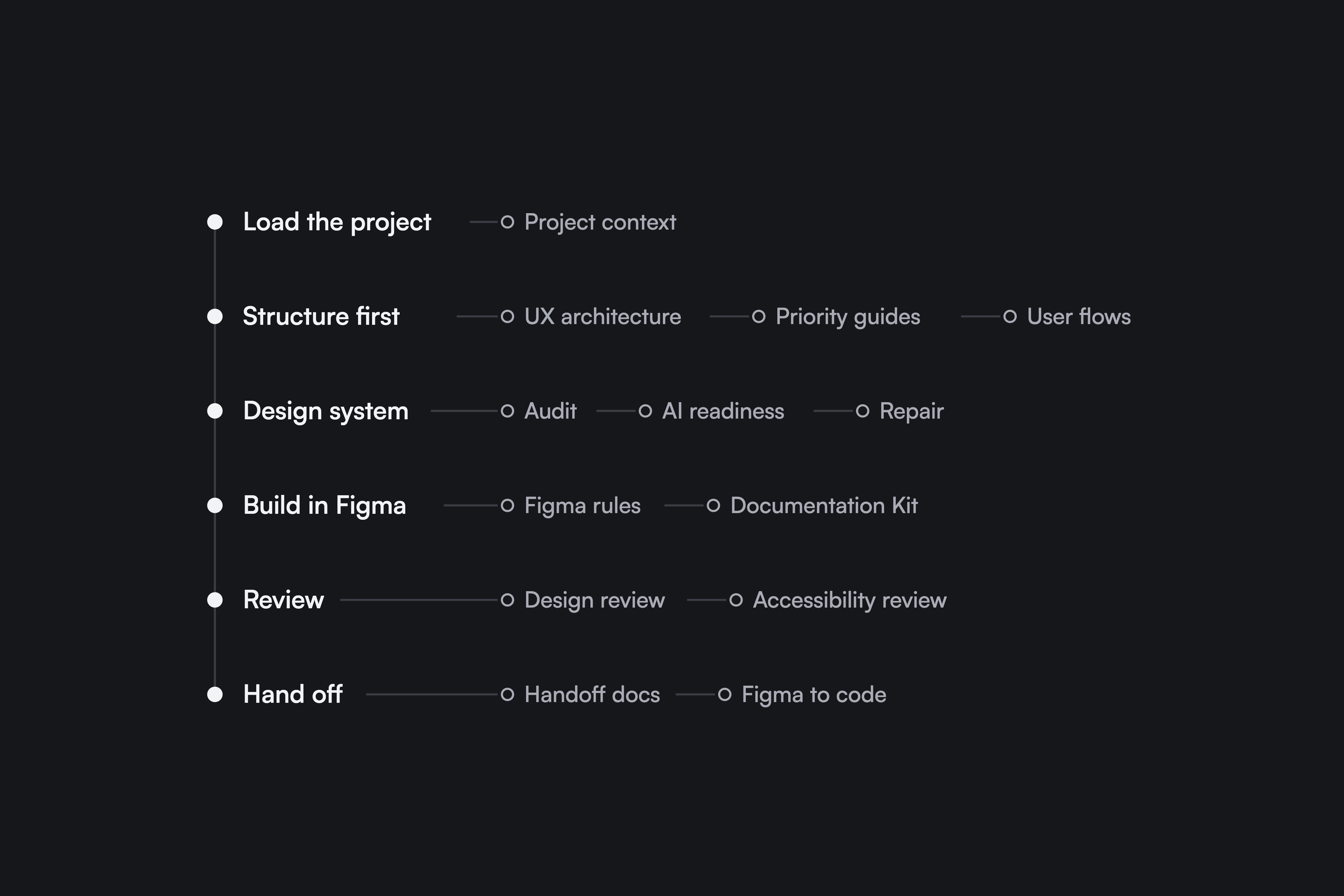
Every task runs through the same six steps
Load the project, structure first, check the design system, build in Figma, review, hand off. Each step has its own skills, written as instructions, references and a clear definition of done. I check the result of every step before the next one starts, so after review the design is ready to hand off. The diagram at the top shows which skill belongs to which step. The six steps are how one task runs. The seven processes below are the kinds of work the harness covers.
Seven processes, one standard
- Start a project: load the product’s design system, sources and earlier decisions, kept per product so the skills stay general.
- Structure before screens: object model, priority guides and user flows, documented in Figma.
- Design-system repair: audit, AI readiness, approved repairs and a second audit.
- Design and build in Figma: design review and structural rules while building.
- Accessibility: WCAG review, findings pinned in Figma, fix and re-review.
- Handoff: decisions, specs and states for engineering.
- Figma to code: screens rebuilt in code and checked against the design.
Structure before screens
Before any screen is drawn, the structure skills decide what each view must show and in what order. In this example from my own product, a process card shows its name first, then its status and progress, then its phases, and its actions last. The card is the top of the process page, so both share the same content, the same order and the same menu.
A real run: repairing my product’s design system
In September I ran the design-system skills on my own product. Like most systems that grow with a product, it had drifted. The audit only collected evidence and changed nothing: 16 findings, from swatch labels that did not match their colours to colours typed by hand inside components. I approved the safe fixes, the repair skills made them in Figma one at a time, and a second audit scored the result.
Before
What the first audit found
- 36 swatch labels that did not match their colours
- 231 colours typed by hand in components
- No radius tokens
- No component descriptions
- Documentation rated 1 of 4 for AI tools
After
What the second audit found
- 0 mismatched labels
- 231 colours bound to design tokens
- 4 radius tokens, 83 radii bound
- 21 components described
- Documentation rated 3 of 4
Three decisions behind it
Write down the judgement, not one big prompt
- What I chose
- Each recurring task became its own skill, with the rules, references and a clear definition of done. A long general prompt was the alternative, but it gives different results every time and nobody can review it.
- What it cost
- Writing and maintaining every skill. Each rule has to be stated precisely enough that it can be checked.
- What it changed
- The same task gives the same quality each time, and a new project starts from the same standards instead of from zero.
Audit before anything changes
- What I chose
- Design-system work starts with an audit that only collects evidence, then a plan I approve. Repairs come after that, never during the audit.
- What it cost
- A slower start, because nothing improves until the audit and the plan are done.
- What it changed
- Every change has a reason on record, and risky changes such as renaming components wait for a decision instead of happening by accident.
Design systems that people and AI tools can both read
- What I chose
- The audit checks a design system for two readers: designers, and the AI tools that build with it. Tokens, names and component descriptions have to be clear enough that nothing needs guessing.
- What it cost
- Extra documentation work that most teams skip.
- What it changed
- On my own product, the documentation score for AI tools went from 1 to 3 out of 4, and the design system now explains itself.
More work
2024
First product designer on a feature-led event platform. Built the design system from tokens to documentation; core event setup went from 60+ minutes to 9.
2025
A brand-refresh brief for a two-sided marketplace became a full product redesign built on seven core objects.
2023
Concept for Vaadin's Collaboration Kit Challenge: second place in the design category among 120+ entries.