Take Take Take Sound Lab
A product for testing sounds in real games, which I designed and built for Take Take Take, the chess app co-founded by Magnus Carlsen.
- Client
- Take Take Take (side project)
- Role
- Product designer and builder
- Year
- 2026
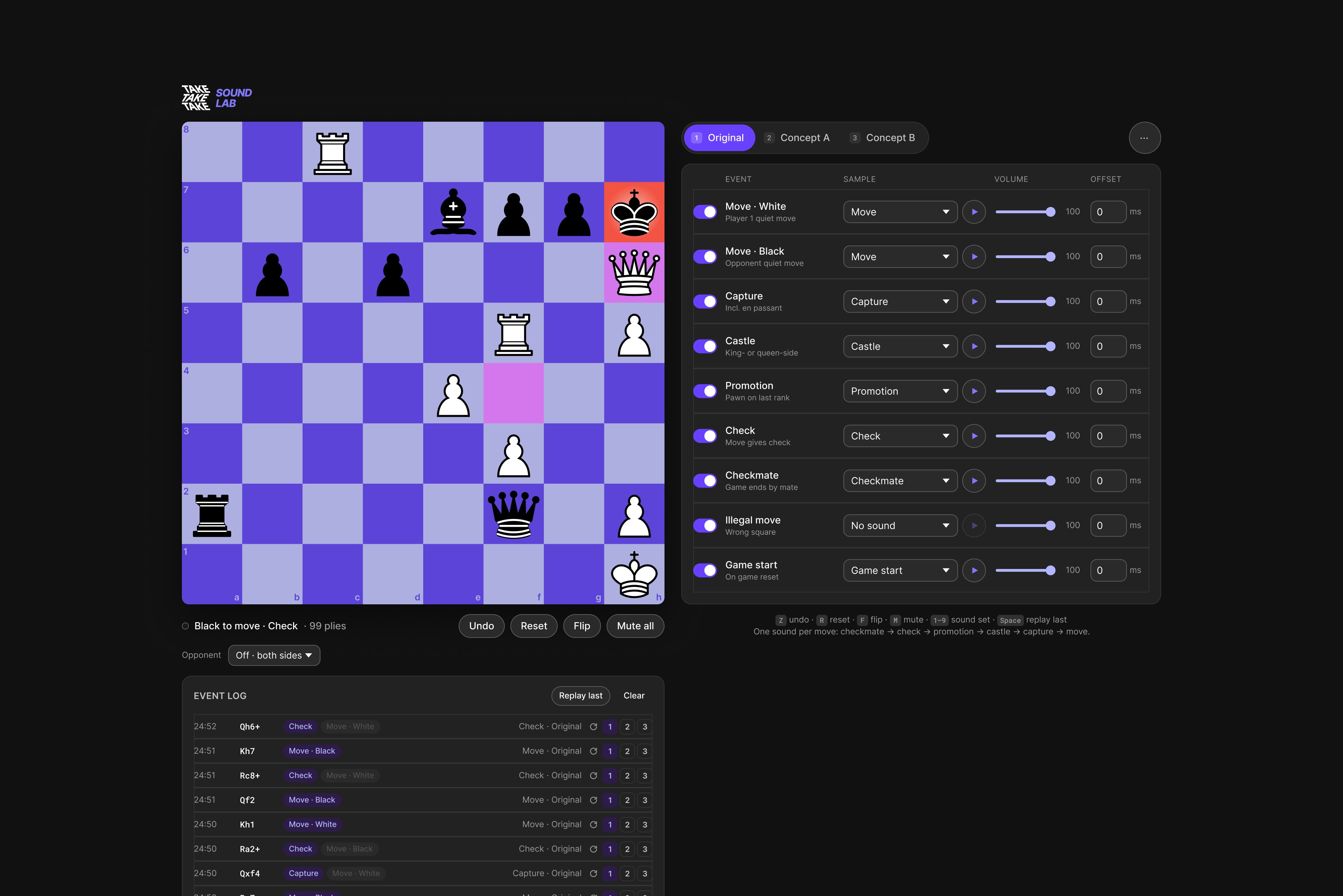
The lab lets a sound designer review, adjust and upload sounds, group them into sound sets, and test them live in a real game, so decisions are made where players actually hear them.
The problem
I've played chess every day for four years, first on Chess.com and Lichess, and since its release on Take Take Take. My feedback on their sounds led to a round of fixes, and the team asked me to help with their sound design.
Making a new sound was the easy part. Judging it was hard. A sound that's pleasant on its own can tire you after forty moves, and a capture can feel weaker than a quiet move once both play in a real game. Sounds lived in a folder, but players hear them on a board, mid-game. There was no way to test a sound where it actually matters.
Who it's for
The first user was me, as the sound designer. The second is the team, who need to hear the options and agree on one. Both need the same thing: hear a sound in a real game, compare it with alternatives on the exact same moment, and change it without waiting for a developer.
The core workflow
I treated the lab as a product with one loop at its centre, from a new sound to a decision:
Step 1
Review
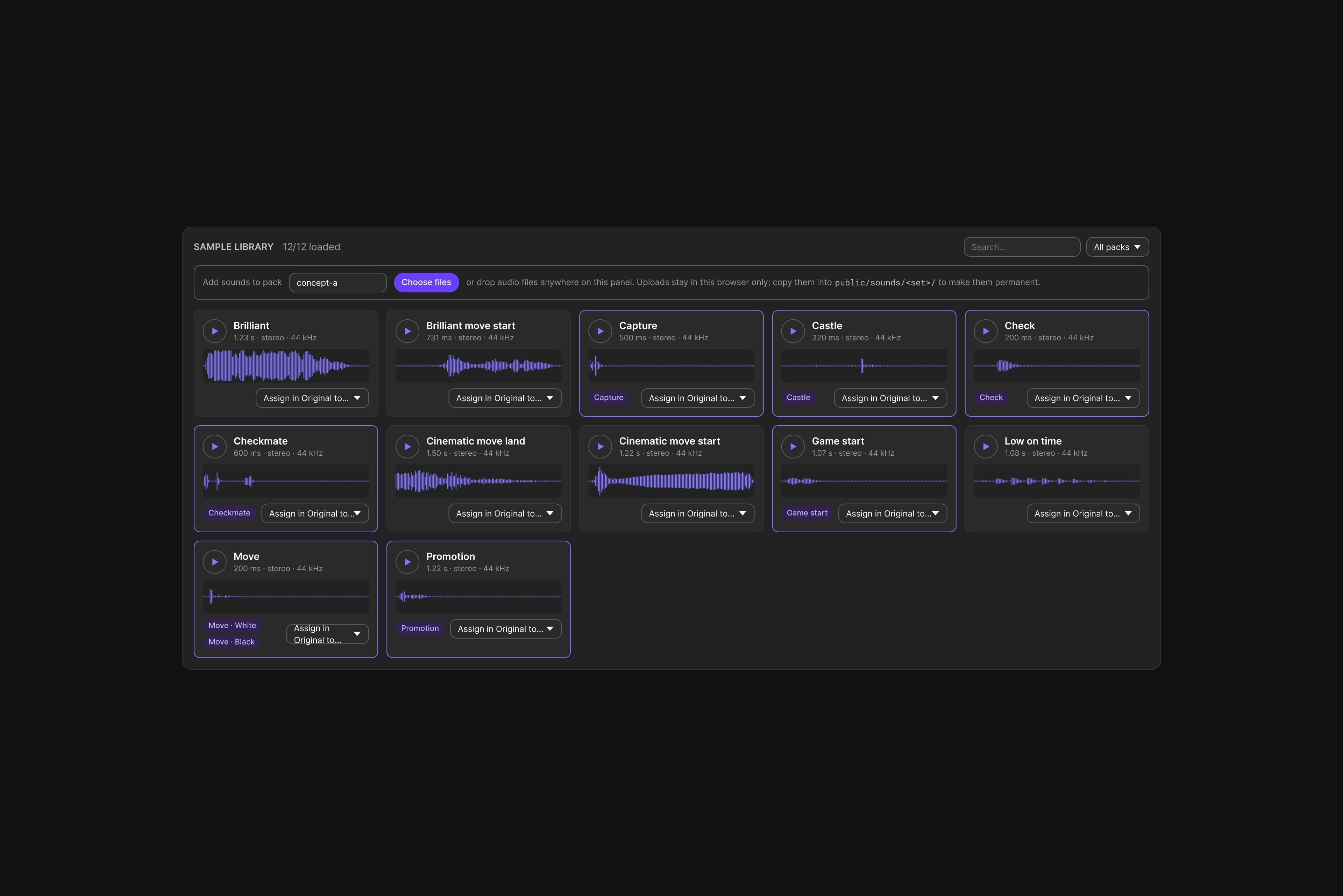
See every sound with its waveform, length and the chess events it's assigned to, and play it on its own.
Step 2
Adjust
Set volume and timing for each of nine chess events, from a quiet move to checkmate, or turn an event off.
Step 3
Upload
Drag new sounds into the browser and use them straight away, with no build and no developer.
Step 4
Build sound sets
Group sounds into sets such as the original and new concepts, then duplicate, rename, export or share them.
Step 5
Test live
Play a real game, against yourself or the Stockfish chess engine, and switch sets on the same move to compare.
How the interface supports it
- The board is the main stage, so every decision is made in context. The sound controls sit next to it, never in a separate screen.
- Each chess event is one row: on or off, sound, preview, volume and offset. The whole sound set can be read at a glance.
- The event log shows which sound each move triggered, so it's clear why something sounded the way it did.
- The sample library is the home for sounds: waveforms, set labels and where each sound is used.
- Keyboard shortcuts keep the hands on the game: 1 to 9 switch sets, Space replays the last move.
Four decisions behind it
Two ways to play: slowly, and for real
- What I chose
- Playing both sides lets me move pieces into the exact position I want to test, like a castle or a check. Playing Stockfish is a real game where I stop thinking about sound, so I notice how it feels when it's secondary.
- What it cost
- Running a chess engine in the browser, with a strength setting and a choice of colour.
- What it changed
- Each sound is judged twice: at the precise moment, and over a whole game the way players hear it.
Compare on the exact same moment
- What I chose
- Every move in the log can be replayed with each sound set, one click per set, and Space replays the last move. Two concepts are compared on the same capture or check, not on two different games.
- What it cost
- A replay system that stores each event and the set that played it.
- What it changed
- Comparisons take seconds, and feedback is about the sound, not the moment it happened to play.
One sound per move
- What I chose
- A move can be a capture, a check and a promotion at once. Only the most important event plays, from checkmate down to a quiet move. An offset per event sets exactly when its sound lands.
- What it cost
- Priority rules the team has to agree on.
- What it changed
- Busy moves stay clear, and every move has one sound to judge.
Change sounds without a developer
- What I chose
- New sounds are dropped into the browser and kept between sessions, and each one plays exactly when the piece lands, with no loading delay.
- What it cost
- Uploads stay in one browser until someone adds them to the project.
- What it changed
- Trying an idea takes minutes, and the lab sounds like the app.
Where sound and product design meet
I've made music since music school at seven: piano, film music, concerts on big festival stages, and presets that ship in official Arturia and Native Instruments sound libraries. This project is where that meets product design: a clear problem, a focused workflow, and an interface built with Claude Code, GitHub and Vercel.
More work
2026
A product design harness of skills that write down how I structure, review and document products.
2024
First product designer on a feature-led event platform. Built the design system from tokens to documentation; core event setup went from 60+ minutes to 9.
2025
A brand-refresh brief for a two-sided marketplace became a full product redesign built on seven core objects.